

We crawled over 200 domains including all URLs linked from the homepage and examined the differences between the rendered HTML and the original source code. The results and some examples can be found in this article.
Differences between the two HTML versions can play a role in indexing, especially for larger websites, and should therefore be taken into account during optimization.
96% of the crawled domains have differences between the rendered HTML and the original source code.
96% of the crawled domains have differences in SEO-relevant areas such as text, internal links, title or meta tags. However, not every subpage of the domains frequently showed differences between the two versions — in total, 56% of the crawled URLs were affected.
For 81 (approximately 35%) of the crawled domains, only subpages and not the homepage show differences between the rendered HTML and the original source code.
Differences by Area
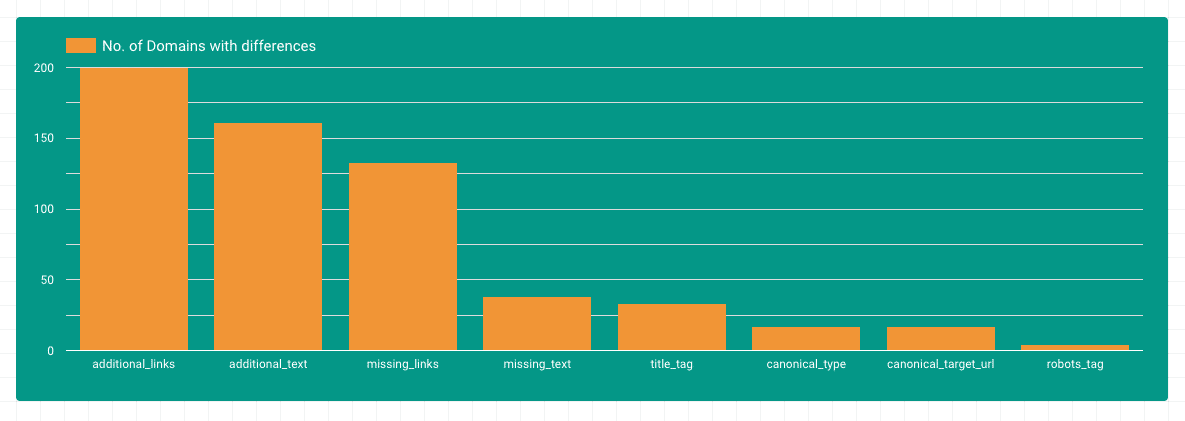
Most differences were found in the areas of additional text and additional content. This makes sense, as dynamic content is loaded into the DOM via JavaScript. It is also notable that there are many domains where links are removed from the DOM by JavaScript. Differences in title, canonical, or robots tags are found on fewer domains.
Internal Linking & JavaScript Rendering
On almost all crawled pages there were additional links in the JS-rendered HTML. Looking at the top pages, nearly 3,000 links per subpage are added in some cases. Here one can assume that the entire main navigation is primarily available in the JavaScript-rendered HTML.
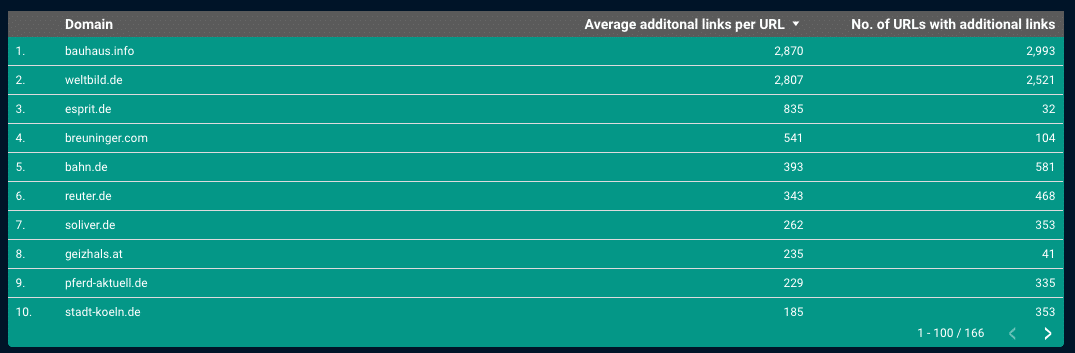
If Google did not take these links into account, many structures and subpages would be missing from the index. It therefore makes sense that Google has been rendering most pages for some time now and is making increasing efforts to truly render all crawled pages and evaluate links inserted via JS. Back in 2017, John Mueller answered the question of whether a link added via JavaScript passes PageRank in exactly the same way as a link in regular HTML:
A link is a link, regardless of how it comes to the page. It wouldn’t really work otherwise.
John Müller, https://s.viu.one/013fc
We found some cases where links visible to the user do not appear in the rendered HTML for Google.
One reason for this is that certain links are only written into the rendered HTML upon a mouseover event. In the original source code and in the rendered HTML (without interaction), the links are not present. As far as is known, Googlebot does not currently execute mouseover events — so this type of link is not “visible” to Google.
An example from our crawl can be found on rebuy.de – in a short video you can clearly see that the links only appear after the mouseover event (example: iPhone XS Max from the main menu):
If you want to make sure that links are already present in the rendered HTML, you should look at the rendered HTML before any user interaction.
Another reason for links missing from Google’s rendered HTML can be that requests required to render the navigation are blocked by the robots.txt file. These can be requests for JavaScript assets without which the navigation does not function, or Ajax sources required for the navigation.
An example from our crawl can be found on klingel.de – here, an Ajax request is sent to the server on subpages to load the main menu, which returns the categories. Once this is blocked, the navigation no longer works:
This can be tested, for example, with the Chrome extension Asset Swapper – simply redirect the corresponding request to a 404.
On the homepage, the links on klingel.de are available even without the Ajax call — here the data for the navigation is passed directly in the HTML source code.
And then there are the cases where links are removed from the rendered HTML.
Here the link element is completely deleted from the DOM — not merely hidden.
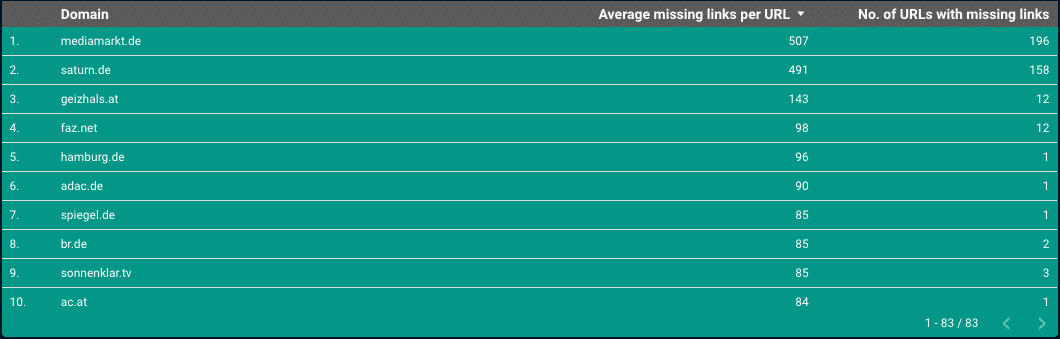
On mediamarkt.de, for example, links from the main navigation that were present in the original HTML are deleted on subpages:
Google will find the links in the original HTML in this case. However, how Google handles the signal that a link apparently is not relevant to the user and has been deleted is currently unknown. One can assume, though, that Google takes this information into account in some way.
Whether the structures in the examples are intentional for internal linking purposes is difficult to say. What matters is that such influences are taken into account during optimization.
Additional Content
In the area of content, there are many domains that contain additional content in the rendered HTML.
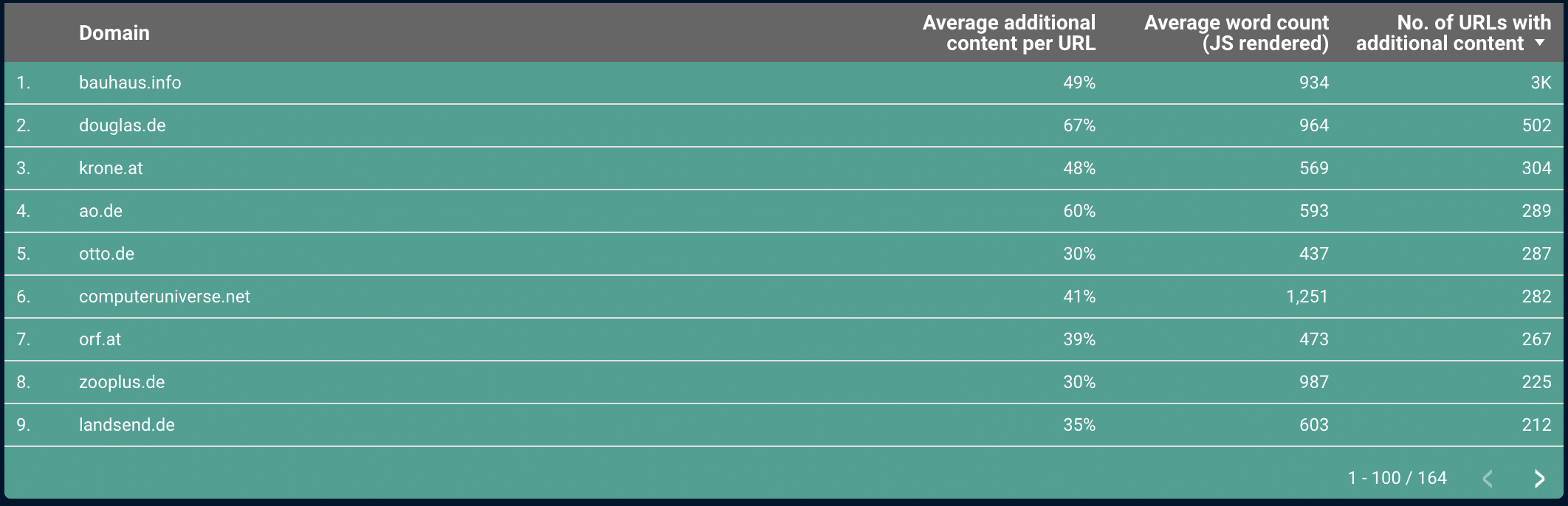
For some of them, it is primarily the content of the consent banner. In the example of wetter.com, a large amount of privacy policy text is loaded via JavaScript through the consent banner. Care should be taken here that too much of this type of content does not dilute the relevant content, in case Google does not cleanly identify the boilerplate.
In the examples we examined where relevant text is loaded subsequently, it was also indexed by Google.
Changes in Title Tags
Looking at the domains with different title tags, lidl.de stands out:

Here the title tag is optimized via JavaScript. Looking at the results in Google, one can see that Google adopts the title tags from the rendered HTML.

Bing, on the other hand, uses the title tag from the original source code.

If you change or set title tags via JavaScript, you should be aware that other search engines may not yet be at the same level. Also, if you have large websites, it is possible that Google does not render all subpages and then uses the title tag from the original source code for individual pages.
Changed Canonical & Robots Tags
In our study, only a few domains showed differences between the rendered HTML and the original source code for canonical and robots tags.
Notably, saturn.de has a “noindex” in the rendered HTML on the privacy page, while the original source code contains no robots meta tag at all. However, the page is listed in Google’s index. In this case, Google does not appear to be taking the “noindex” from the rendered HTML into account.
Caution is also advised when JavaScript modifies or prematurely closes the head section. This can cause the canonical tag to appear outside the head, meaning it will no longer be recognized if the tag only exists in the rendered HTML.
Conclusion
Hardly any website today can do without complex JavaScript, which also has a direct impact on how Google sees a website.
In summary, the topic of JavaScript rendering adds yet another layer of complexity to an SEO’s work. Particularly with regard to internal linking, there are various pitfalls that only become apparent very slowly. But the other areas should also be kept in mind. Where applicable, the possibilities that JS rendering brings can also be used for optimization purposes (e.g. of title tags).
Access to the Complete Data
You are welcome to access the complete data as a Data Studio report.
Simply enter your details here and you will receive the link to the Data Studio dashboard by email.
 English
  German