SEO Audit Tool Over 100 checks, sorted by impact
searchVIU checks every URL on your website with every crawl. The issues that affect the most pages and clicks come first.
Which of hundreds of findings cost you clicks?
An audit quickly turns up hundreds of issues. What matters for your work is which of them affect pages with traffic. That is why searchVIU weights every finding with the clicks from Search Console.
Which of these really matter?Severity depends on the pages and clicks affected.
A few pages or a whole template?Every finding is broken down by page type.
Is this new, or has it always been like this?Every crawl is compared with the previous one.
Every URL goes through over 100 checks.
Indexability, canonicals, hreflang, redirects, internal linking, JavaScript rendering, sitemaps, performance and content. An excerpt from the list:
| Check | Severity depending on impact | Topic |
|---|---|---|
| Canonical points to a redirect The canonical target of a page redirects itself. | low to high | Canonicals |
| hreflang without return link The linked language version does not link back. | medium to high | hreflang & language |
| Redirect chain A URL redirects through several intermediate steps. | medium to high | Redirects |
| Robots meta tag changed by JavaScript noindex or nofollow differ between the source code and the rendered HTML. | high to critical | JavaScript rendering |
| Indexable page missing from the XML sitemap An indexable page is not listed in any known sitemap. | low to high | XML sitemaps |
| Internal link to an error page Internally linked URLs respond with 4xx or 5xx. | medium to critical | Internal linking |
The same check can be medium or critical.
How serious a finding is depends on how many pages and how many clicks it affects. Each check has three possible levels. For a missing title, they range from Medium to Critical. If the title is missing on three pages without traffic, that is a medium finding. If it is missing on all product pages, it becomes critical.
Your worklist, sorted by page type
In the SEO Issues cockpit you see every finding by page type, with its status and history across recent crawls. Each check also tells you how to fix it.
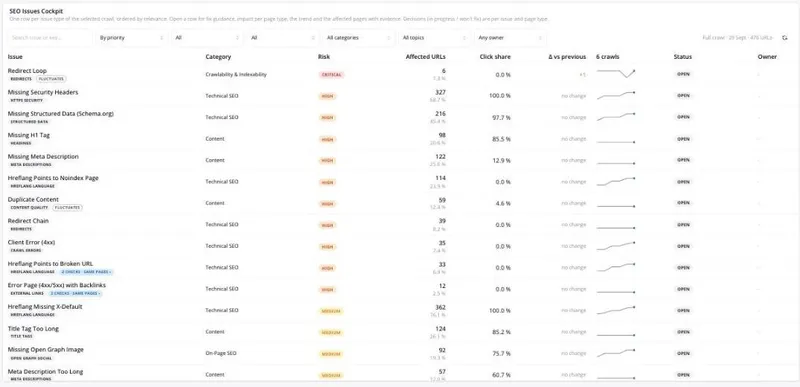
Real screenshot from our demo project with searchviu.com.
Many findings, often one cause
The AI assistant links findings to likely causes, such as a template, the server, the robots.txt or a sitemap. A finding on 1,240 pages then leads you to the change that most likely triggered it. You can switch the AI feature off.
More about the AI assistant1,240 pages are affected, all of them product pages. The title is unchanged in the source code, but the product name is missing from the rendered HTML.
This points to a change in the product template that takes effect via JavaScript. Check the release from week 41.
The audit runs every week with the crawl.
Nobody has to restart the audit. It runs with every full crawl, and new problems reach you as alerts.
Every week, every URL rendered.
Over 100 per URL, weighted by clicks.
With the last crawl, so anything new stands out.
By email, Slack, Teams or webhook.
All checks are in a public list
The list of all active checks is public and shows when it was last updated. Checks that don't measure anything reliable are switched off and not counted.
No new findings this week
Known findings stay on the list until they are fixed. If nothing new turns up, the audit shows that too.
- No new findingssince the last crawl
- Two fewer findingsfixed since the last crawl
- No findings from critical checksacross all page types
Frequently asked questions about the SEO audit
We already have an audit tool. What does searchVIU do differently?
searchVIU checks with every weekly crawl, weights every finding with your Search Console clicks and reports anything new as an alert. Data consulting is included at every tier. SEO monitoring tools compared
Do we need Search Console?
Yes, for weighting by clicks. Some checks also need specific data, such as XML sitemaps or JavaScript rendering. The checklist states this for every check.
How often does the audit run?
With every full crawl, so every week. On your most important pages, Page Watch also checks some of the points continuously throughout the day.
We only need a one-off audit.
searchVIU is built for ongoing monitoring, because many errors only appear with later releases. We can discuss in the demo what a start could look like for your website.
What does the audit cost?
The audit is included in SEO Monitoring, from €399 per month with 50,000 URLs included. Data consulting is included. You can find all prices on the pricing page.
Let's talk about your website.
In the demo, Michael shows you how searchVIU works. We use your website and a demo project for it.
- Request in three short steps
- Quick alignment on crawler access, NDA and Search Console
- Demo with your website and the demo project
- Start planned and supported together
Which website is it about?
Please enter your website and your business email.We need your business email for the demo. Without a company address, you can use our free tools instead.
What do you need?
Select as many as you like.
Who are you?
We only use your details for the demo. More in our privacy policy.
We need your business email for the demo.Please check your email address.Please enter your website.Please check your website address.The spam check could not be loaded. Please email us at info@searchviu.com.That didn't work. Please email us at info@searchviu.com.

Thanks! Now pick a time.
The calendar shows the open slots for your call with Michael.