- You connect Search Console with your own Google account. searchVIU only gets read access.
- Each property becomes a separate data source under Project Settings › Connections › Data Sources.
- The import runs every night and pulls in about 16 months of history the first time.
Data imported into the project
searchVIU imports clicks, impressions, CTR and position per URL and per search query, also by country and device. Sitemaps submitted in Search Console are crawled automatically as well. The Google Search Console Integration page shows where you’ll find the figures afterwards.
Before you start
- Owner or Admin in the project. Only these roles see Project Settings › Connections.
- A Google account with access to the property. If you don’t have access, an owner of the property adds you in Search Console.
- Ideally the domain property. It covers all subdomains and protocols.
- A Google account that stays with the team. Only the person who created the connection can re-authenticate or delete it later.
When you start, we’re happy to go through the setup with you.
Connected in six steps
Open Data Sources
Open Project Settings › Connections › Data Sources and click “Connect Data Source”.
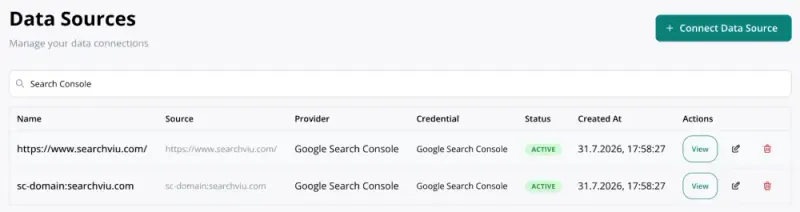
Two Search Console data sources in the demo project Choose Google Search Console
Under “What do you want to connect?”, choose the “Google Search Console” card.
Sign in with Google
Click “Connect with Google”, choose the Google account with access to the property and allow access. Back in searchVIU, “Connection verified” appears.
Choose the property
“Choose a Search Console site” lists all properties of your Google account. Search for your domain and choose the property that matches the project’s website.
Create the data source
searchVIU suggests the property URL as the name. Click “Create Data Source” to create the data source.
Check the data
The day after connecting, you’ll see clicks and impressions per URL, for example in URL History. In the crawl report they appear from the next crawl onwards.
Connect another property
Start the wizard again and choose your existing connection under “Use an existing Google Search Console credential”. Add each property only once. Otherwise the import counts every day twice.
- Someone new takes over. The previous person deletes their data source, and the new person adds the same property again with their own Google account. The import picks up where it left off. If the previous person is no longer reachable, write to us first.
- Disconnecting. Whoever created the data source deletes it via “Delete”. Imported data stays in the project. If you want it deleted as well, write to us.
Data protection
Google gives searchVIU read access to Search Console and to your account’s email address. The sign-in applies to all properties of the account, but only the ones you add as a data source are imported. searchVIU stores the credentials encrypted, and project data is stored in the EU. More on the Security page.
Troubleshooting
“Authorization cancelled”, “Authorization link expired or invalid” or “Google reported a problem”
Reload the page and try connecting again after a short while. If the error persists with a company account, ask your IT team whether Google Workspace allows third-party apps to access Search Console.
“No verified sites for this Google account in Search Console.” or the property is missing
Your Google account has no access to the property. Ask an owner of the property to add you, or sign in with another account via “Connect a new one”.
Clicks are missing in the crawl report although data has been imported
searchVIU matches the figures by exact URL. If the property doesn’t match the crawled URLs, for example www versus non-www, the columns stay empty. In that case, connect the domain property and delete the data source that doesn’t match.
No new data or “Credential is not active. Please test the connection first.”
The Google connection has probably expired. Open the data source and click “Test Connection”. If the test fails, the person who created it signs in again via “Edit” and “Re-authenticate with Google”. The next import fills gaps of up to 30 days automatically. We backfill longer gaps on request.
FAQ
Do I need to add searchVIU as a user in Search Console?
No. You sign in with your own Google account, and searchVIU reads with that account’s access.
Which property fits country folders such as /de/ and /fr/?
Connect the domain property, for example sc-domain:example.com. If SEO Performance Monitoring should evaluate each country separately, add the URL-prefix property for each country, for example https://www.example.com/de/. In the crawl report, each URL still counts only once.
Why do the figures differ from Search Console?
Google delivers new data with a delay of 2 to 3 days and adds to it afterwards. That’s why the import fetches the last three days again every night. In addition, Google returns at most 50,000 rows per day and search type via the API, and anonymised queries are missing.
Do I need the bulk export to BigQuery?
Signing in with Google is enough for the import. For large websites, the bulk export delivers more rows, and we’re happy to set it up with you on request. More in the guide Search Console BigQuery Export.
Next steps
Still have a question? Write to us at info@searchviu.com.